On Snapchat, it's not possible to make a story that's already been posted private after the fact. The only solution is to create a private story from the very beginning, visible only to the friends whichever you choose.
Here are the 4 steps to create a private story on Snapchat.
1. Click on the image that matches your profile
Start by Open Snapchat on your phone, then tap the’profile picture (tone Bitmoji, located in the upper-left corner of the home screen).
From this screen, you'll create your new private story and choose who can see it.

2. Create a new private Story
From the section «Stories», under your username, tap «New private story». Contacts you don't invite won't receive no notification and don't know that private stories exist. This feature protects your privacy : Only the friends you select can access your content.

3. Choose your contacts
This is the most important step: you select one by one Friends who are allowed to see your private story. Here's how to do it:
- Check the contacts of your choice from your address book Snapchat.
- Press the blue «Create a Story» button» at the bottom of the screen to confirm.
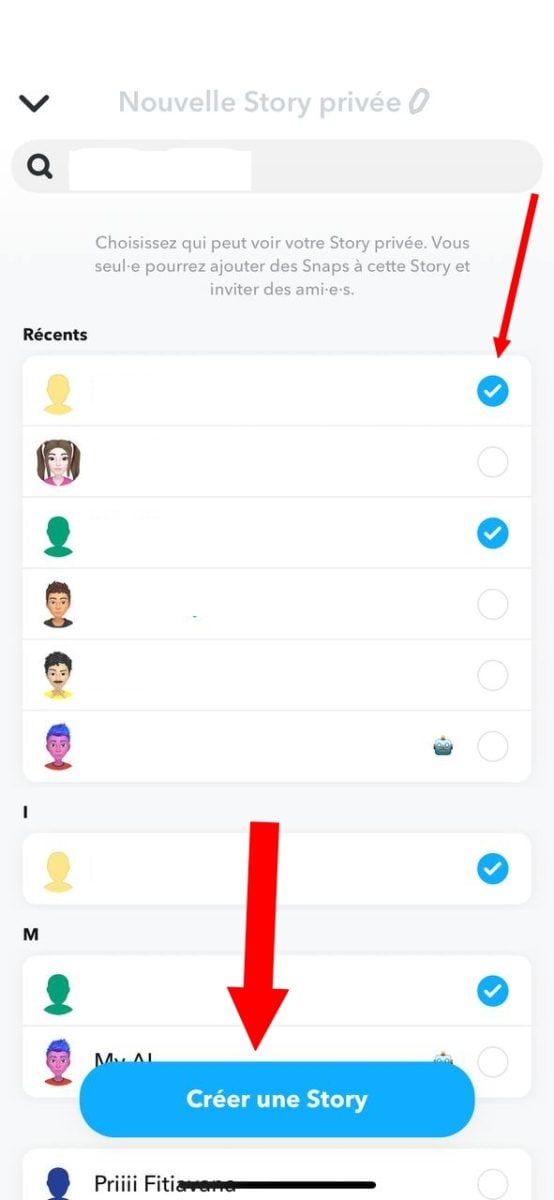
4. Name your private Story
- Name your private story to customize it, then tap "Save" button to complete its creation.

Your private story will then appear on your profile page with the the name you gave itas well as friends' names authorized to view it. To share content there:
- Take your snap using the capture button (photo or video, with or without filters) Snapchat).
- Customize it with text, stickers, or a cutout.
- Press "Send to post it to your private story.
Your story remains visible for 24 heures, only for the selected contacts.
FAQs
Can you delete a private story on Snapchat?
Yes. Tap your private story from your profile, then tap the three dots in the top-right corner. You can delete a single snap or the entire story. The deletion is immediate: the content disappears for all invited friends.
Are friends notified when you create a private story?
No. Snapchat doesn't send any notifications to the friends you select when you create it. They simply see the private story appear in their Stories feed when you post a Snap to it.
How do private stories on Snapchat work compared to regular stories?
A classic Story is shared with all your friends (or the public, depending on your privacy settings). A private story is visible only to the friends you've chosen. That's the only difference: everything else works the same way on Snapchat (24-hour duration, photo or video snaps, filters).
To learn more, find out how Find out who views your private story multiple times or how Find out if someone has a private story on Snapchat.









 English