Would you like to use web scraping to extract online data quickly? Thanks to specialized extensions for Chromeyou can automate these tasks without writing a single line of code.
But What is the best web scraping extension for Chrome? That's exactly what we're going to look at together in this article! Here's a clear comparison to help you make the right choice:
| 🧩 Extensions | ⭐ Highlights | 🌈 For whom? |
|---|---|---|
| Web Scraper.io | Very complete, powerful, pagination management | Developers, data analysts |
| Data Scraper | Quick and easy for paintings | Beginners, occasional users |
| Instant Data Scraper | Scraping with a click, no configuration required | Non-technical users |
Top 3 best Chrome extensions for web scraping
1. Web Scraper.io

Web Scraper.io is one of the most popular Chrome extensions. powerful and popular. Thanks to this tool, you can data scraper on both simple and complex websites.
👉 Key features :
- 📌 Creating custom sitemaps
- 📌 Pagination management
- 📌 Extract text, images, links, HTML attributes
- 📌 Export data to CSV or JSON
- 📌 Scraping locally or via the cloud
👉 For whom?
Web Scraper.io is ideal if you need to retrieve large volumes of data. It is the the perfect scraping solution for developers, data analysts and marketing professionals.
2. Data Scraper

Data Scraper is a Chrome extension very easy to useperfect for quickly extracting data from an HTML table or a list of items displayed on a web page (tables and simple lists).
👉 Key features :
- 📌 Automatic detection of tables and lists
- 📌 Live data overview
- 📌 Quick export to Excel or Google Sheets
👉 For whom?
Data Scraper is primarily intended for beginners and users who want to extract simple data without too much configuration. You can do it in just a few clicks!
3. Instant Data Scraper

Instant Data Scraper is the ideal solution for extract tables (prices, comparisons, league tables) and item lists (emails, product sheets, contacts, titles). No need to create a sitemap or understand the DOM structure, you'll be able to scrape your data in just a few clicks.
👉 Key features :
- 📌 Automatic scraping without configuration
- 📌 Intelligent detection of structured data
- 📌 Export results to CSV or Excel
👉 For whom?
Instant Data Scraper is the perfect extension for beginners who want to scraper without code. It is also aimed at marketers and data analysts who need to collect information and product lists quickly.
Want to try out the extension? Find out more how to install Instant Data Scraper by clicking on the link.
How to use a web scraping extension on Chrome?
In this short tutorial, we invite you to discover how to use the Web Scraper.io extension to scrape data in just a few clicks. Don't worry, you don't need to be a programming whiz! It's very simple:
Step 1: Add the extension to your Chrome browser

- 👉 Go to Chrome Web Store.
- 👉 In the search bar, type Web Scraper.io, then click on it.
- 👉 Then click on the ADD TO CHROME.
- 👉 Confirm by clicking on ADD THE EXTENSION in the pop-up window.
Step 2: Launch Web Scraper.io
Open the’development tool (F12), then select the’WEB SCRAPER tab. This tab will be your dashboard for all your scraping operations.

Step 3: Create a SITEMAP and add a selector
The sitemap is your scraping action plan. It tells Web Scraper.io what information to retrieve. Next, to tell the tool what to extract (title, price, etc.), you need to add selectors.
Selectors are codes that tell the scraping extension where to find the element to retrieve on the page you are interested in. That's why it's useful to create and add them!
Step 4: Configure pagination selectors
If the site you are scraping has several results pages, you must configure pagination. This tells Web Scraper how to move from one page to another to collect all the data. To do this:
- 👉 Add a new selector.
- 👉 Name it Pagination.
- 👉 Choose the Link type.
- 👉 Tick the case MULTIPLE.
- 👉 Then click on the button SELECT.
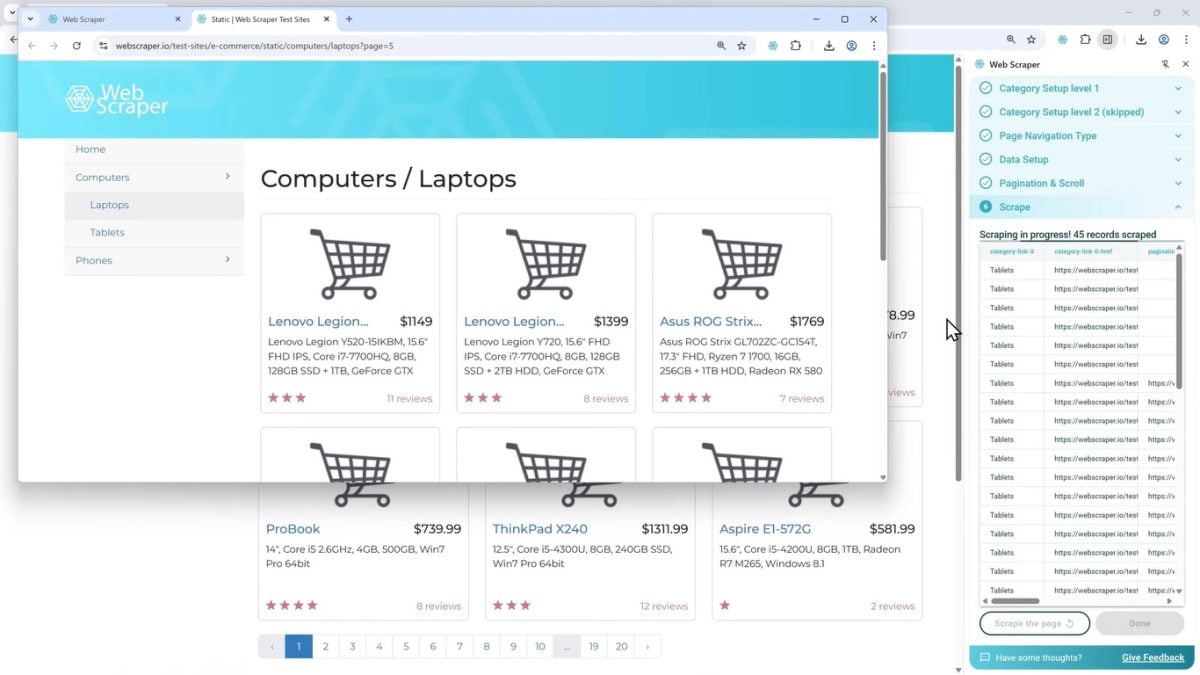
Step 5: Start scraping
Is your sitemap configured? Selectors added? Pagination OK? At last, you're ready to extract and collect data! Here's how to start scraping:
- 👉 In the top menu of the Sitemap, click on the’SCRAPE tab.
- 👉 Leave the default settings.
- 👉 Click on the button START SCRAPING.
A new window will open on the side. Here you can view the scraping process: the extension navigating the site and collecting data. The window will then close automatically when it's finished!
Step 6: Export data
Once scraping is complete, the data is stored locally in your Chrome browser.
You can easily export them by clicking on DONEwith the option of choose between several formats (CSV, Excel or JSON) according to your needs.

How to choose the best Chrome extension for web scraping?
The best Chrome extension for web scraping depends on your needs.
- 👉 If you're a beginner, it's best to opt for simple tools as Instant Data Scraper.
- 👉 Are you no longer a beginner in this field? You can opt for more technical extensions like Web Scraper.io, which offers more advanced and powerful scraping functionalities.
In any case, here are the criteria to be taken into account to choose the best Chrome extension :
- ✅ User interface : Is the extension intuitive? Is it easy to select the elements to be extracted?
- ✅ Features : Does it handle pagination? Extracting text, images, links? Can data be exported in different formats?
- ✅ Business model : Free, freemium or paid extension? Beware of limitations
- ✅ Support and documentation : Good documentation or an active community can help you master the extension and its features faster!
Find out all about it in detail in our complete guide to web scraping extensions.
What are the alternatives to web scraping with a Chrome extension?
Web scraping extensions are practical, but their capacities are limited. For example, they don't allow you to scrape large volumes of data.
If you need more advanced functions, it is better to opt for one of these alternatives:
1. Web scraping tools
Web scraping tools are software and/or applications in their own right, specially designed for scraping. There are many more powerful than extensions, allowing for the collection of large amounts of data. In addition, web scraping tools do not require a web browser to function.
Web scraping tools are often not free. Most, however, offer freemium plans that allow you to use basic scraping features for free.
And for those who know nothing about programming, tools such as Bright Data and Octoparse allow you to scraper without code. We tell you more in our full review of Bright Data.
2. Code libraries
Do you like to have complete control over your projects? This is entirely possible with scraping if you are comfortable with programming! All you need to do is create your own scraper with Python.
To do this, you must use code libraries like BeautifulSoup, Scrapy, or Selenium.
- 📌 Beautiful Soup allows you to easily extract data from HTML or XML pages
- 📌 Scrapy is a complete framework for large-scale scraping
- 📌 Selenium is used to automate the actions of web browsers to interact with dynamic pages (JavaScript, forms, clicks).
Interested in this alternative? We explain it all in our article on web scraping with Python.
If you want to learn how to code for scrapbooking, you can also create your own scraper with Node.js and powerful libraries such as Puppeteer and Cheerio.
3. Cloud scraping services
Cloud scraping services use a cloud-based infrastructure to extract data automatically website. Subscription services such as ScrapingBee or ScraperAPI manage the entire scraping process for you: IP rotation, bypassing blocks, JavaScript rendering, etc.
Moreover, if you are scraping websites that rely heavily on JavaScript to display their content, the web scraping in JavaScript becomes essential for efficient data collection. You'll be able to extract information easily via a simple query!
Cloud scraping services are the ideal alternative for monitor pricesanalyze product trends or for collect consumer reviews.
FAQs
Is web scraping with an extension legal?
The use of a Chrome extension for web scraping is not illegal in itself. It all depends on how you use it, as well as the terms of use of the site you are interested in.
We can say that legality of web scraping is in the gray zone. Scraping public data is tolerated, but be sure to check the policy of the site you're targeting before taking the plunge.
Can I scrape any website?
❌ NO. Some extensions have limitations on sites with dynamic content (JavaScript). They are also unable to collect data on sites protected against scraping.
What's the difference between a scraper and a crawler?
- 👉 The scraper extracts data from a website (prices, product descriptions, reviews, etc.)
- 👉 The crawler automatically explores the pages of a website; it is mainly used to find URLs
Used together, the two tools form an excellent tandem for the web scraping The crawler finds the links, and the scraper then retrieves the data from the pages found.
Can I extract data from Google Maps with an extension?
✅ YES. You can use a web scraping extension to extract data from Google Maps.
All you have to do is install it in Chrome. The extension will collect automatically names, addresses, telephone numbers and reviews on Google Maps. You can then export them in CSV or Excel format.
How can I scrape pages that require a login?
Some web scraping extensions (such as Web Scraper.io) allow you to scraper pages with login. But you must first log in manually to the site for this to work!
It should be noted, however, that the effectiveness of this solution depends on the protections put in place.
How do I scrape multiple pages on the same site?
It's possible to scrape multiple pages on the same site with Chrome extensions. Extensions like Web Scraper.io allow you to manage pagination automatically. This is possible thanks to selectors configured to click on «Next Page»... So you don't have to do anything, the extension takes care of everything!
The Chrome extensions for web scraping are really handy tools for collecting data online. Just choose the right extension!
Which one do you plan to use for your scraping project? Do you know of any other effective extensions for scraping? Tell us everything in the comments!









 English