You've just had a WHOOP bracelet and you want to set an alarm ?
In this article, we take you step by step through the process, how to set an alarm on WHOOP.
Don't worry, it'll only take you two minutes!
Do you have the latest model of Whoop?
Where can I find the WHOOP alarm?
Find out all about the Whoop alarm in this video:
Explanatory video in French by Alucare, ideal complement to the page. View video (you can use YouTube's automatic translation)

L'WHOOP alarm cannot be set directly from the wristband. You'll have to use the mobile application!
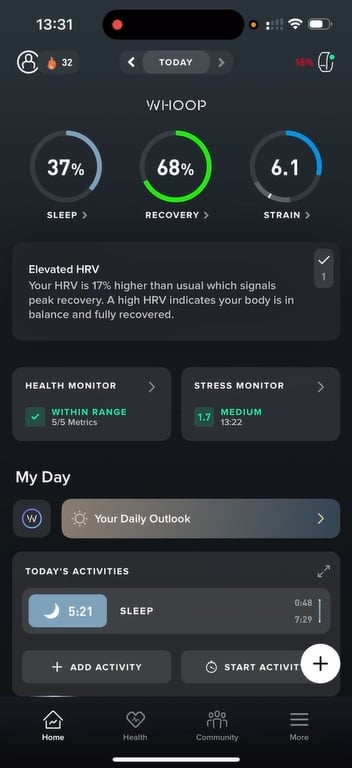
Rest assured, it's really very easy to find the alarm option in WHOOP application :
- Open the
- Go to the Sleep
- Then in the section dedicated to the alarm.
In just a few seconds, you'll be in the right place to set the alarm on your WHOOP bracelet.
Explanatory video in French by Alucare, ideal complement to the page. View video (you can use YouTube's automatic translation)

How do I configure and use the WHOOP alarm?
1️⃣ Open the sleep planner
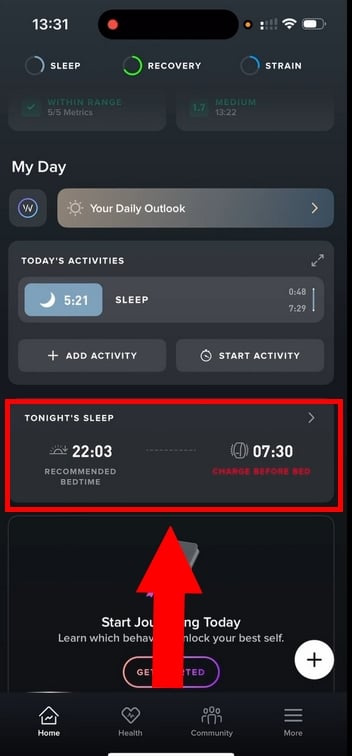
- Open the WHOOP application on your smartphone
- Go to the Tonight’s Sleep (the sleep planner)
- This is where all the alarm settings are located.
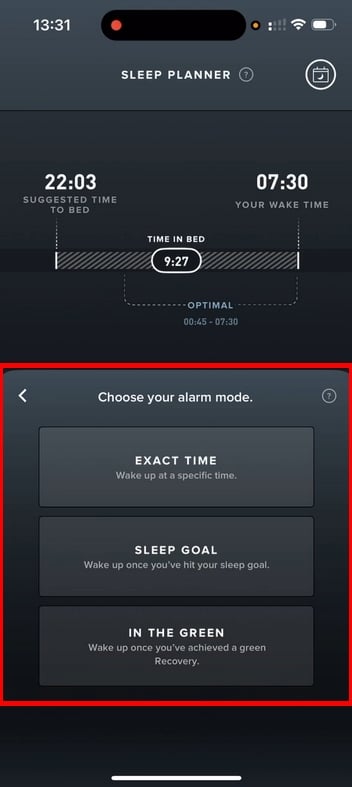
2️⃣ Select alarm mode
In the alarm dashboard, you can choose between three alarm modes :
- Exact Time
- Sleep Goal
- In the Green
3️⃣ Set time and parameters
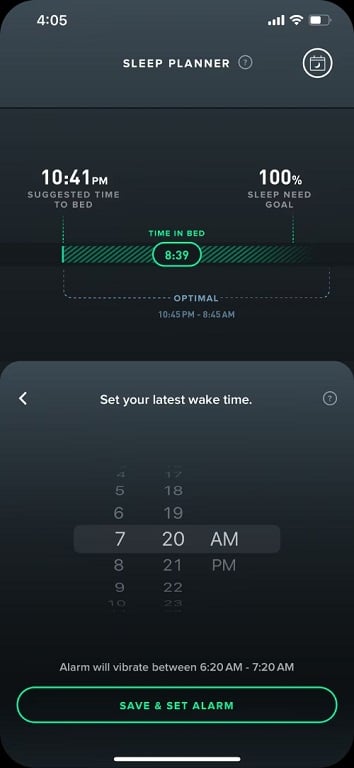
- To Exact Time, simply select the desired time
- For modes Sleep Goal Where In the Green, you can choose a cut-off time, but also a target sleep / recovery level.
4️⃣ Activate alarm
- Once you've made your choices, all that's left to do is activate and/or register the alarm.
- Make sure that the« we »is activated before going to sleep.
⚠️ IMPORTANT : before going to sleep, make sure your WHOOP bracelet is connected to your phone AND fully charged, otherwise the alarm may not synchronize properly.
How do I stop the alarm?
- Just double-tap your WHOOP bracelet to stop the vibration.
- Otherwise, the alarm stops automatically after 30 seconds.
- However, you can also deactivate the alarm from the’WHOOP application.
Looking for a new Whoop model?
How does the WHOOP alarm work?
The WHOOP alarm is a haptic alarm It doesn't make a sound - it vibrates directly on your wrist!
👉 You set the alarm in the app, but it's actually the WHOOP bracelet that triggers the vibration. At the set time, the bracelet vibrates gently for 30 seconds about.
Depending on your needs, WHOOP offers 3 alarm modes :
- ⏰ Exact Time
You choose the’exact time of your alarm clock, the bracelet vibrates at precisely that moment.
- ⏰ Sleep Goal
Indicate your sleep goal (e.g. 8 hours). WHOOP will then wake you up in the hour before your deadline, as soon as your sleep target is reached.
- ⏰ In the Green
Once again, you choose a wake-up time limit. WHOOP waits until your recovery score is «green» and then wakes you up within the hour!
Pour plus de détail sur le fonctionnement de l’alarme WHOOP ainsi que toutes ses fonctionnalités, vous pouvez consulter notre article : Est-ce que WHOOP possède une alarme ?
Is the WHOOP alarm more effective than a conventional alarm?
A conventional alarm simply sounds at a set time, sometimes when you're in a deep sleep. The WHOOP alarm, on the other hand, relies on your physiological data to wake you up at just the right moment!
Indeed, theWHOOP alarm :
- ✅ Real-time sleep analysis
- ✅ Tracks your sleep cycles
- ✅ Takes into account your recovery score
The aim is to wake up when your body is ready, not just when the clock says so.
What are the features of the WHOOP alarm?
Much more than just an alarm, the WHOOP alarm offers a number of advantages health-related features.
On the program:
1. Wake up in line with your sleep cycles
With alarm WHOOP, no rude awakenings! In fact, WHOOP analyzes your sleep phases during the night, all to wake you up for a few minutes. light phase, rather than in deep sleep.
2. Integrated sleep monitoring
The alarm doesn't work in isolation: it's directly connected to your sleep analysis. The data collected by the bracelet is used to optimize wake-up time.
3. A wake-up call based on your recovery
With the In the Green, WHOOP bracelet is waiting for your recovery score either optimal before vibrating (within the limit you set). That way, you'll be awake when your body is 100 % ready!
4. Complete customization
You can set WHOOP alarm according to your needs and preferences. You can :
- Select an exact time
- Setting a sleep goal
- Set a flexible cut-off time
- Adjust vibration intensity to suit your preferences
To find out more about all the bracelet's other features, take a look at our full opinion on WHOOP.
Where and how can I download the WHOOP application?
The WHOOP application is available on the’App Store (iPhone) and the Google Play Store (Android).
To install :
- Open your smartphone's application store
- Type « WHOOP »in the search bar
- Download the application, then install it like any other app.
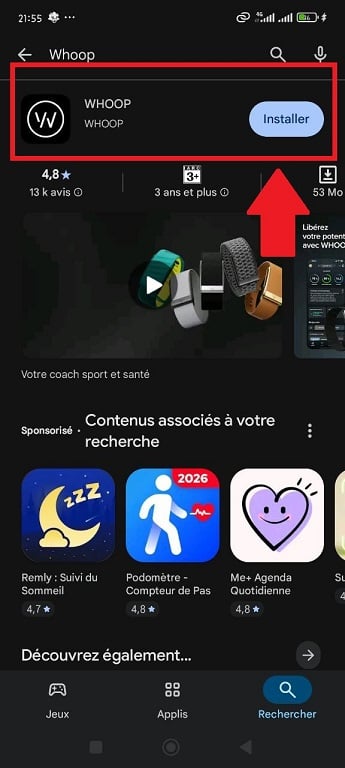
In just a few minutes, you can connect your WHOOP bracelet and access all your health data (sleep, recovery, effort, daily score, etc.).
Set an alarm on WHOOP takes just a few seconds, but your sleep and wake-up times will never be the same again! Thanks to the WHOOP alarm, you can adapt your alarm clock to your body.
So, are you ready to optimize your recovery?
By the way, which alarm mode best suits your routine? Tell us all about it in the comments!
And for more useful articles about WHOOP :










 English