Want to delete your Netflix history for personal reasons or so that the platform can recommend other content to you?
Don't panic! We've got a complete guide to help you!
Find out in this article step by step how find and delete your history netflix !
1. Where can I find my Netflix history?
Find Netflix history on a computer
To can delete your viewing activities On the streaming platform, let's start by finding the page that allows us to perform this action!
To do this :
- Meeting on netflix from a web browser,
- Log in to your account and click on your profile photo located at the top right of the screen,
- From the drop-down list, choose Account,

- Then press the Modify Settings then on Historical (if there is only one registered user).
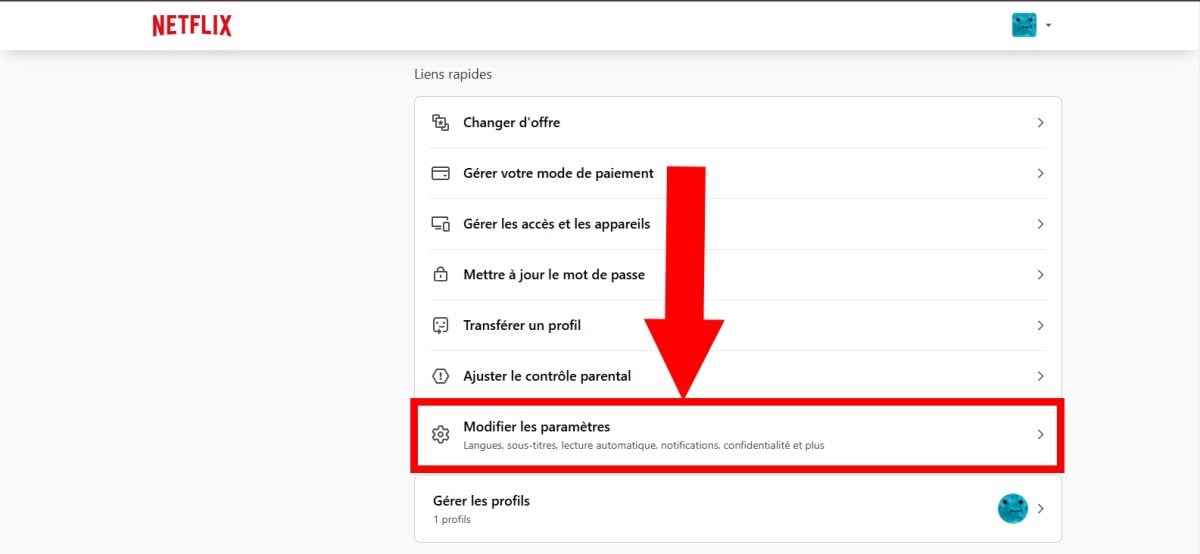
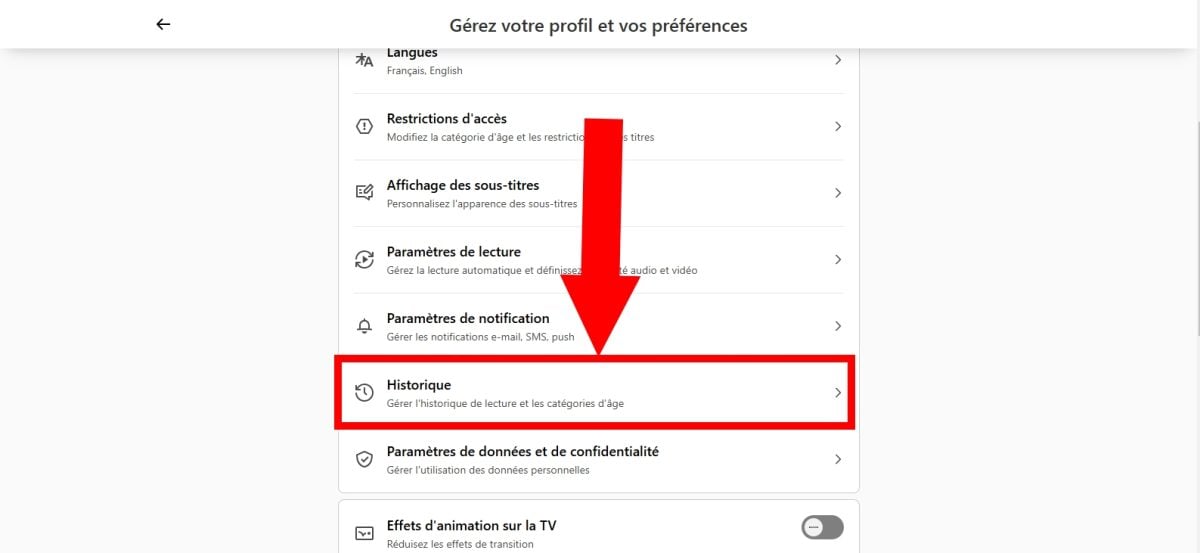
- However, if you share your Netflix account with other people, press Profiles and parental controlsthen select the one you wish to delete.
- You will land on a new window where you can access your entire viewing history on Netflix.
Find your Netflix history on the mobile app
To view this section on your mobile device, the steps are very simple!
- Visit theNetflix mobile application on your smartphone,
- Once there, press your profile photo at the bottom right of the screen,

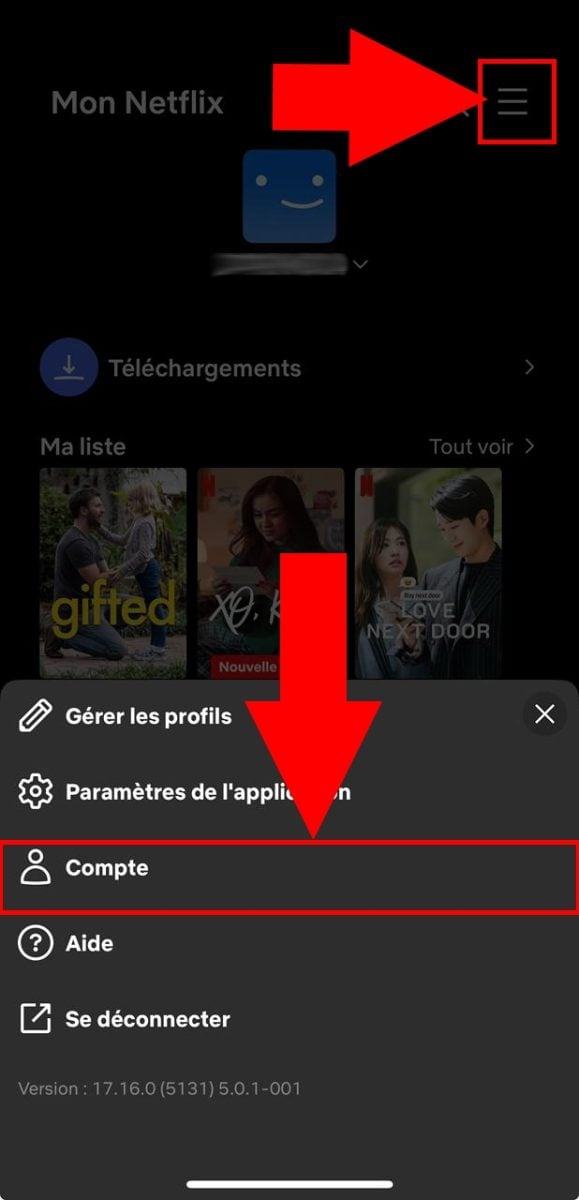
- Then, tap the three horizontal lines at the top right of the screen.
- From the options displayed, press Account,
- Then, further down, you'll see Data and privacy settingsyou can press it,
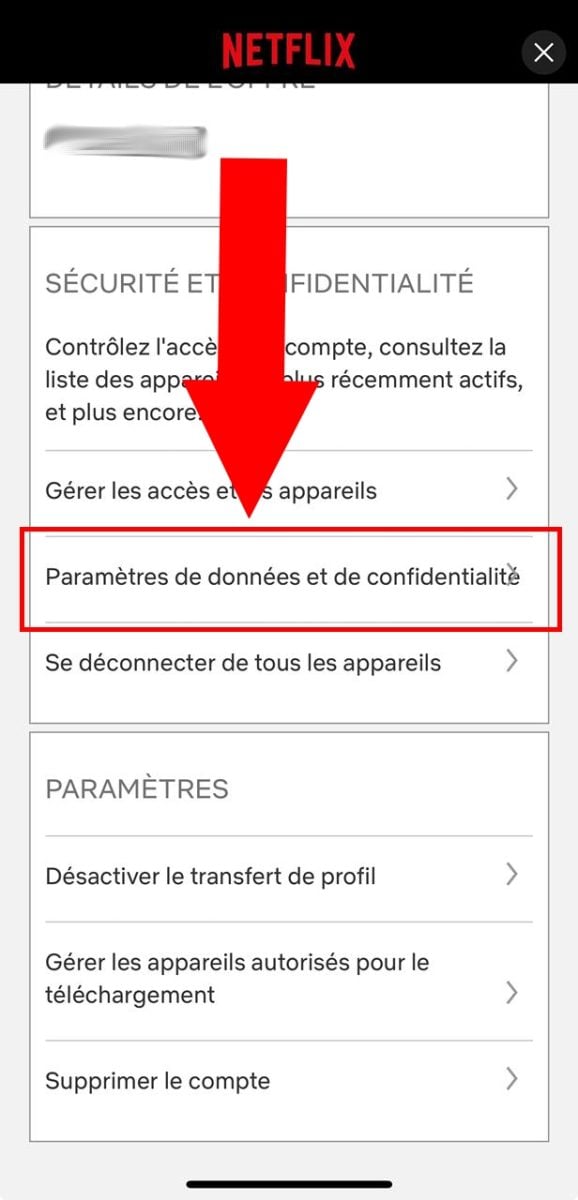
- Congratulations! On this new page, you can access your Netflix history !

Note The stages remain virtually the same on the two Android operating systems and iOS to find it. However, the steps illustrated above were performed on an iPhone.
2. How do I delete my Netflix history?
How do I delete a specific item on Netflix?
To delete a movie or a series in particular :
- Meeting on netflix from your usual web browser,
- From your news feed, locate the section Resume reading/Resume with (username),
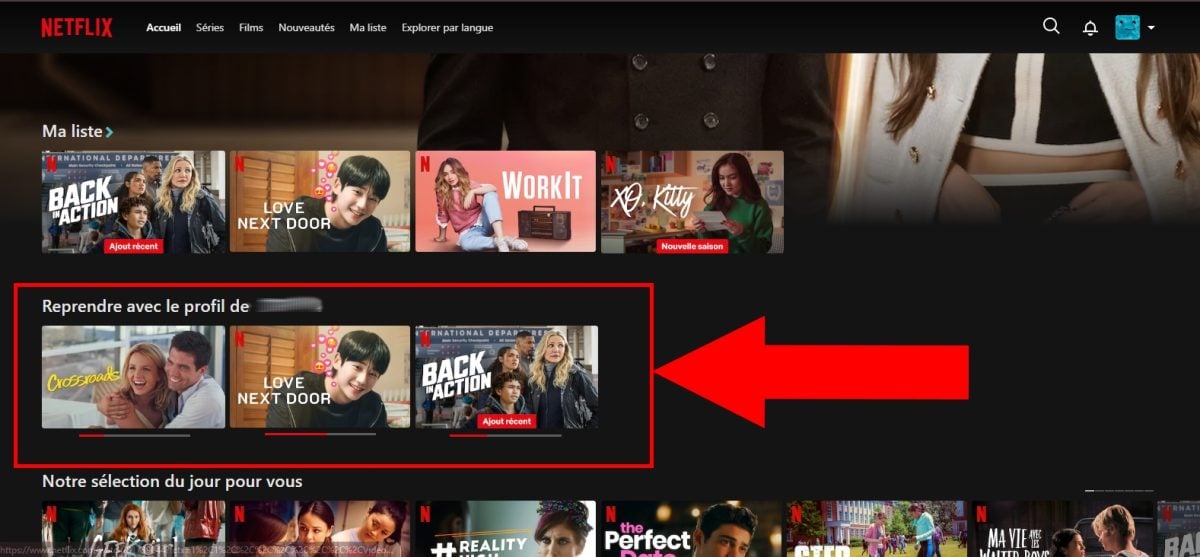
- Simply place your mouse over the film/series to be removed from it,
- A X icon should appear to allow you to delete it,

- Click top and confirm the reason why you want to delete it.
How do I delete my entire history on Netflix?
Here's how to do it:
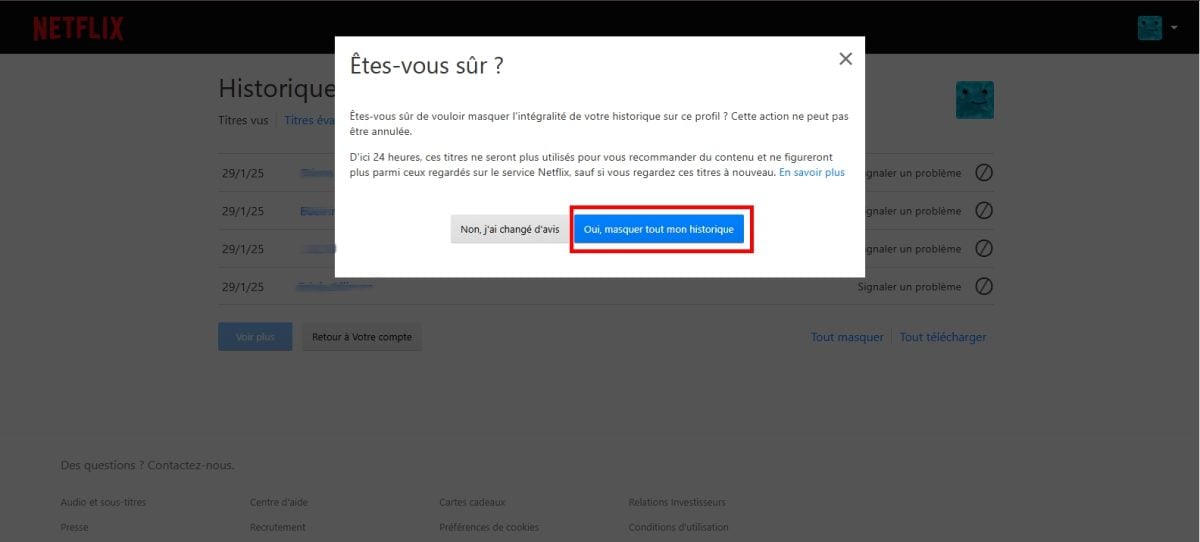
- Go to the Historical by following the steps outlined above,
- At the very bottom, click on Hide all,

- Therefore, you still have the option to change your mind. But if you are sure you want to delete everything, confirm the action by placing the cursor on Yes hide all my history.
What precautions should I take?
It should be remembered that historical data is a means for the platform to offer content that match your taste in film, documentary or series.
That is why, before delete a specific title or all the titles on the platform, you should know that :
- Films and series you've watched will no longer be considered by the platform as content you have viewed,
- netflix will no longer be used to recommend similar videos (after 24 hours) unless you watch them again.
- They will also be deleted from the Resume reading.
3. How do I manage my Netflix history?
a) Hide a specific title
- Go to the Historical of the profile whose title you wish to hide,
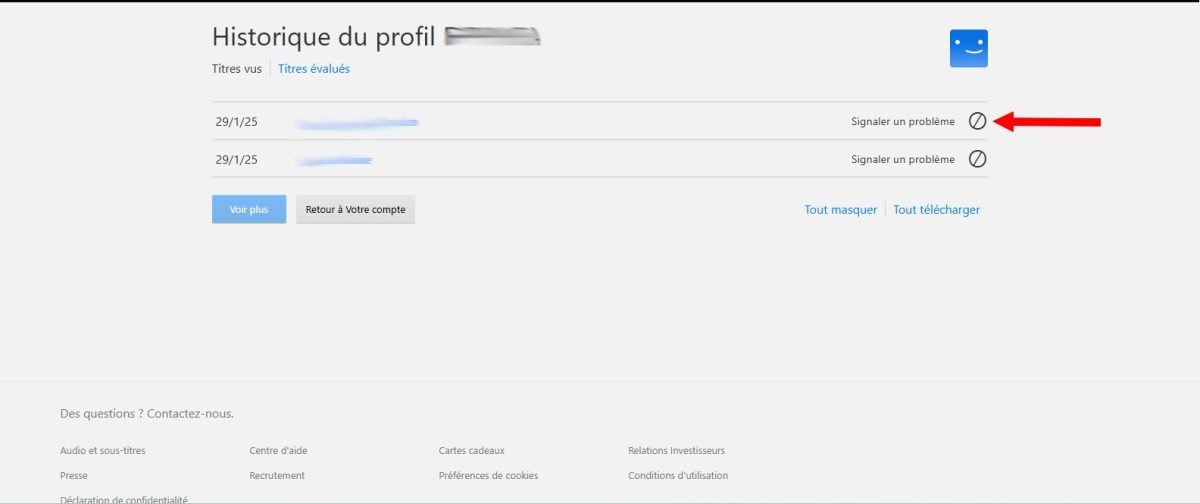
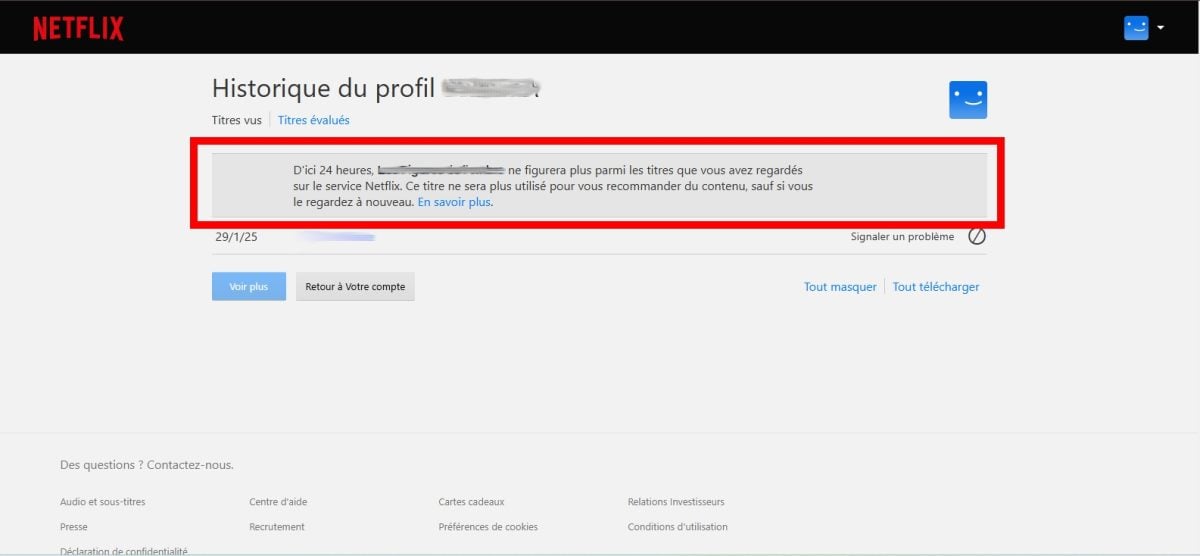
- Click on the crossed-out circle on the right of the security concerned.
- And there you have it!
Nevertheless, you must wait 24 hours to see it completely hidden on all your devices.
b) Personalize your profiles
The great thing about Netflix is that you can set upother profiles (up to 5) for yourself, your loved ones, or family members for a tailor-made Netflix experience. What's more, everyone has specific recommendationsbased on its preferences and history.
Are you tempted?
- Meeting on netflix from your browser or the app if you are on a mobile device,
- Then press Manage profiles,
- Then click on + Add a profile,
- Assign a name to it, then press Save or Continue.
Congratulations! It will now appear in the account profile listYou can use it at any time to enjoy other (different) videos!
- And did you know? You can pay less for Netflix with the right tools! Don't miss this opportunity and click on this link!
c) Managing recent activities
For better YOU organize on the streaming platform, and have control over what you're going to watch later, or whatever, here's how to do it:
- Go to your news feed,
- Stop when you see Resume playback/Resume with profile from (not username).
- Then place your cursor on a specific title to do what you want with it,
- Finally, choose from options at your leisure, including delete the title of the latter or of the list, theto add, etc.
Why delete your Netflix history?
What are the most common reasons for deleting a user's history?
In general, the reasons are as follows:
- He wants to preserve his privacy,
- It will share your account but doesn't want to reveal his tastes,
- It seeks to avoid personalized recommendations,
- Another person is using his account, and he wants to steer the Netflix algorithm toward that person. offer more suitable videos to his liking.
However, please note that if you prefer not to (or never to) delete this one, Netflix will continue to suggest similar contentswhich is a shame if you want explore new horizons. What's more, if you share your profile, you run the risk of seeing your disclosed preferences on the platform.
And There you go ! To delete a specific title or hide all your Netflix history holds no secrets for you anymore!
Please feel free to contact us. ask questions or at share your experience in the comments area!
But not so fast! How about exploring other clever techniques before leaving, such as :








 English