Do you want to watch netflix on your TV From your phone? There are several ways to do this, depending on your device: Chromecast, Smart TV, HDMI cable Where screen mirroring.
Here's everything you need to know to choose the right solution and set it up in just a few seconds.
1. Stream Netflix from your phone to your TV with a Chromecast
the Chromecast is a small case designed by Google. Connected to the HDMI port on your TV; it acts as a bridge between your telephone and your television.
It lets you watch Netflix on a big screen, and it also works from a tablet or one computer.
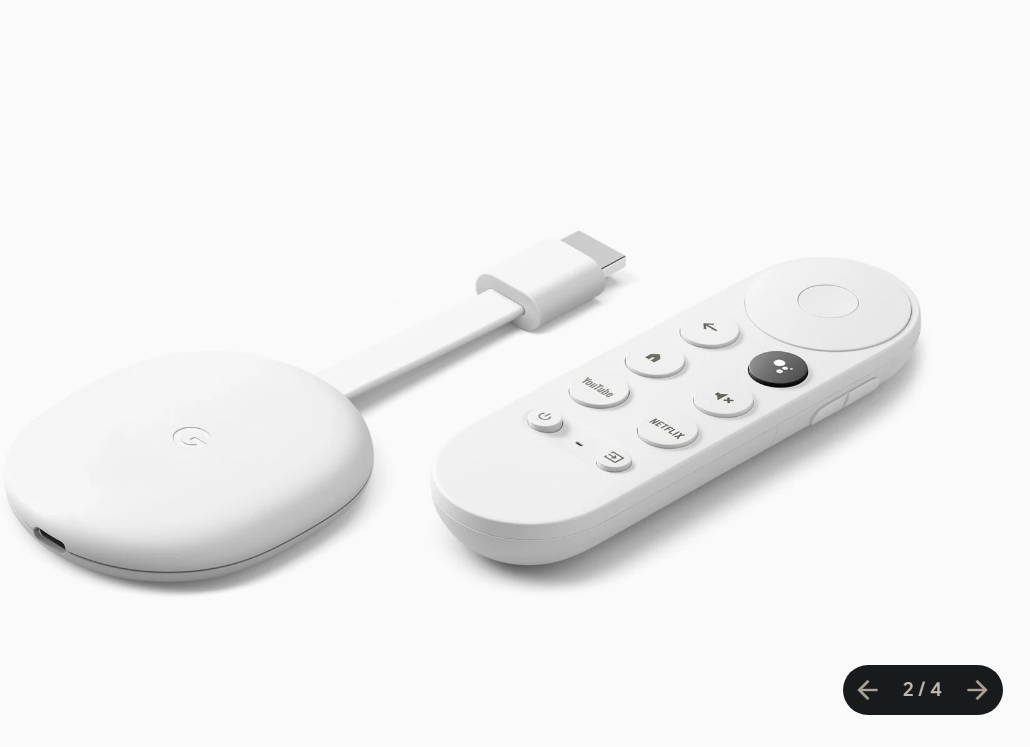
How do I configure the Chromecast?
If you use the Chromecast For the first time, follow these three steps to initial configuration :
- Plugged the Chromecast on a HDMI port Unplug it from your TV, then plug it into a power source.
- Download the application Google Home on your smartphone.
- Configure the device on the same Wi-Fi network on your phone by following the instructions in the app.

This step with Google Home is necessary only at the Initial Setup. Then, you can cast directly from each app without having to go back to it.
How to stream Netflix with a Chromecast?
Netflix is compatible with the Chromecast. It only takes a few seconds to get started watching Netflix on your TV:
- Make sure your Chromecast is properly connected to a HDMI port on your TV.
- Open the app Netflix on your phone.
- Press the’Cast icon, in the upper-right corner of the screen.

- Select your Chromecast in the list of devices available on the network.
- Spear Watch a movie or TV show, then enjoy your TV.
2. Connect Netflix with integrated Chromecast functionality
Some TVs go beyond standard Cast compatibility: they come with a built-in Chromecast built-in. No need for a dongle on the HDMI port—your television appears on its own in the list Cast.
Which TVs offer this feature?
Here are the TV brands that include the function Built-in Chromecast :
- Philips
- Polaroid
- Sharp
- Skyworth
- Soniq
- Sony
- Toshiba
- Vizio
If your TV is on this list, you don't need to install anything.
How to connect with an integrated Chromecast?
The connection is even more simple ...only with an external dongle: No need to set up the Google Home app. Your TV will detect itself automatically, as long as it's on the the same Wi-Fi network than your phone. Follow these steps to watch Netflix on your TV:
- Open the Netflix app on your smartphone (Android or iPhone).
- Press the Cast icon in the application.
- Select your TV from the list of available devices.
- Spear Watch a movie or TV show, then enjoy Netflix on the big screen.
If nothing appears, check to make sure both devices are connected to the same network.
Stream Netflix from Your Phone to Your TV Using a Smart TV (Without Chromecast)
Use the Netflix app built into your Smart TV
Your Smart TV has a internet access which lets you open streaming platforms directly, without any accessories. Most recent models already come with a integrated Netflix application, accessible from the main menu.
To watch netflix On a big screen, it couldn't be easier:
- Turn on your Smart TV.
- Open the Netflix app from the menu or the home screen.
- Log in to your Netflix account.
- Enjoy your movies and TV shows.
This is thethe easiest and most reliable way to access : No Chromecast, no screen mirroring, and no network settings to manage. Your phone remains completely free to use while the content is playing.
Screen Mirroring
the Screen Mirroring mirrors the content of your phone onto the big screen in real time. The connection can be wireless or wired, depending on your device. There are two main technologies:
- Miracast : Streams video and audio from a mobile device to a TV without a cable. Compatible with Windows and Android.
- AirPlay : streams video and audio wirelessly to a compatible TV or a Apple TV. For users of Mac, iPhone, and iPad.

Here are the steps for the Screen Mirroring depending on your phone.
On android :
- Check Make sure both of your devices are connected to the same Wi-Fi network.
- Unroll your notification bar and tap « Smart View ".
- In the list of available devices, Select your TV and click Start.
- Authorize Complete the connection by tapping «Allow» on your TV.
Explanatory video in French by Alucare, ideal complement to the page. View video (you can use YouTube's automatic translation)

On iPhone :
- Check Make sure both of your devices are on the same Wi-Fi network.
- Open the Control Center and presses the’Screen Capture icon.
- In available devices, Select your TV (or your Apple TV).
- Enter the code on your iPhone AirPlay that appears on the TV.
Explanatory video in French by Alucare, ideal complement to the page. View video (you can use YouTube's automatic translation)

Please note: the quality and smoothness of the mirroring vary depending on the devices used and the internet connection.
Use an HDMI cable (wired solution)
The most traditional solution is still to Connect your phone to the TV using an HDMI cable. Its main advantage: this method works without Wi-Fi, making it the ideal solution for a non-smart TV or when you don't have a network connection available.
All you need is a adapter compatible with your device. Then plug the cable into a HDMI port without a TV. This wired method has both advantages and limitations:
| Advantages | Disadvantages |
|
|
FAQs
I don't have a Cast icon on my phone. What should I do?
If the’Cast icon If it doesn't appear in the Netflix app, try these solutions in order:
- Restart your telephone.
- Restart your Chromecast.
- Restart your modem or router Wi-Fi.
- Make sure the phone and TV are connected to the same network.
- Check whether the problem affects only one application or all of them.
- Reset your device Chromecast as a last resort.
Reminder: Since the end of 2025, streaming from Netflix to a Chromecast is available only to subscribers without advertising.
If you're on the ad-supported plan, the Cast icon will no longer appear. In that case, go through the HDMI cable or the screen mirroring.
The image is blurred or jerky. How can I improve quality?
Start by checking the the quality of your internet connection. A Ethernet cable Connecting to your Smart TV ensures a much more stable connection than Wi-Fi.
Also make sure that your apps and make sure your phone's operating system is up to date, since an outdated version can also affect playback quality.
Can I use my mobile data to stream Netflix to my TV?
Yes, you can use your mobile data to watch Netflix on your TV, as long as you use a HDMI cable and an adapter.
Most wireless methods, such as the Chromecast require a shared Wi-Fi network to work.
Be sure to check that your plan is big enough : Streaming uses a lot of data, and you risk additional costs once you've exceeded your plan's data allowance.
How can I connect my iPhone to my TV without Apple TV?
There are two simple options available to you. You can use AirPlay if your Smart TV is compatible, or plug in a adapter into the HDMI port on your TV.
Are all Smart TVs compatible with screen mirroring?
Most Smart TVs support screen mirroring, but not all of them. Check the specifications of your model before making a purchase.
To pay less for your subscription, find out how to get Netflix cheaper in our dedicated article.







 FR
FR  RU
RU  EN
EN  ES
ES  IT
IT  DE
DE  ZH
ZH  PT
PT  ID
ID  JA
JA  DA
DA