Discord is a communication platform where you can chat via text message or video call. It is mainly aimed at video game enthusiasts.
In this article, we will discover together, step by step, how to create an account Discord.
1. How do I create a Discord account on a computer?
Here are the steps to follow create a Discord account on a computer according to the information on the platform itself:
- The first thing to do is go to Discord. Type www.discord.com on your web browser. You will then be asked if you want to download and install the Discord application on your device. Click on “Connection” if you wish to continue using the browser.

- The next step is to register on DiscordThe "Sign up" button is located below the login form.

- Next, enter your email address, username, password (try to create a secure password that is difficult to guess), and date of birth. Then, accept the Terms of Use for Discord and click the Next button as shown in the photo below.
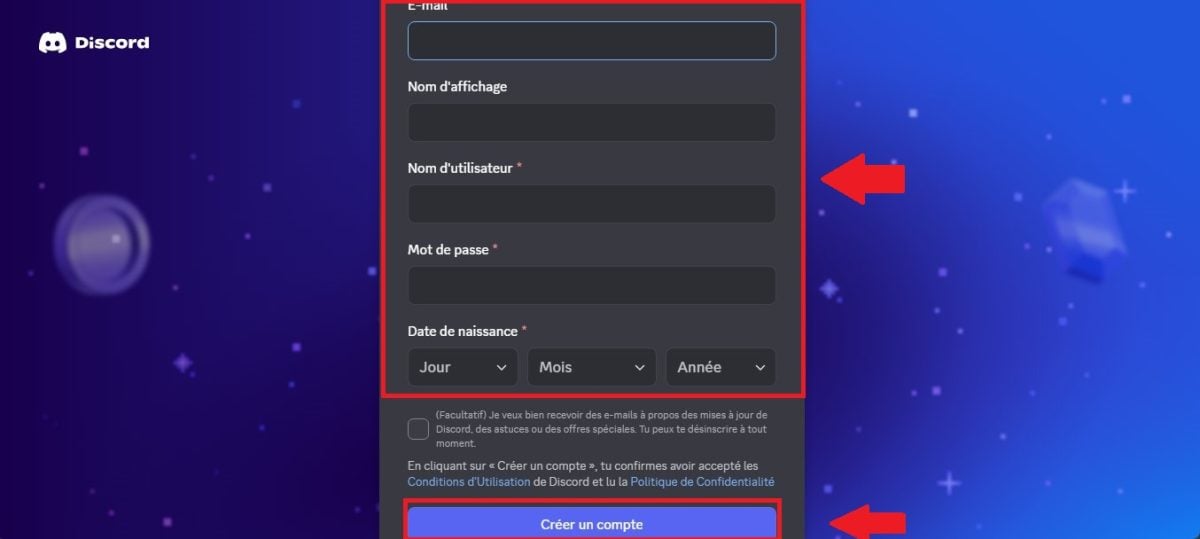
- Check the Captcha box or the box marked "I am not a robot." You will then receive an email allowing you to verify your email address. Click on this email and your Discord account will be up and running.
2. How do I create a Discord account on my phone?
Here are the steps to take to create a Discord account on a smartphone according to the platform itself:
- start with Download the Discord mobile app on your device (go to the Play Store on Android and the App Store on iOS). Launch the Discord app and you will see this interface. Since you are on Discord for the first time, tap Register.

- Enter your phone number and your email address, then click Next.
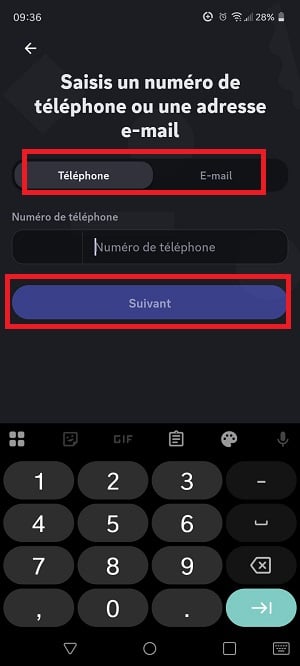
- Enter the display name that you selected on Discord.

- Create your account using a unique username (you can use numbers) and a password.

- Enter your age, then click on "Create an account."

- Go to your email inbox to confirm your registration on Discord with the email address you provided.
Note from Discord:
If your new account is not verified, seven days after creating the account, you will notice that 5 random digits added to the end of your username.
FAQs
Can I create a Discord account without an email address?
You cannot create an account on Discord. without an email address.
- In addition, Discord recommends using an email address. to which you have access and that you can keep to create your account.
- If you want to change the email address associated with your account, you will need access the original email which was used to create the profile.
- The use of Discord features is also conditional on the use of an email address. For example, in order to view servers on the platform, it is essential to check your email.
- The email address allows you to recover your account if you forget your password.
According to the Discord support, it is a security system which aims to protect users and communities.
Why can't I register on Discord?
If the platform mentions that theRegistration on Discord is not possible., it may be that:
- The email address or phone number used has already served to create another Discord account.
- You are not of legal age to register on the platform.
- Your internet connexion encounter a problem.
- The Discord platform is experiencing a bug.
Always try to check the problems on your part upstream.
What is the minimum age to have Discord?
You must have at least 13 years old to be able to register on Discord according to the platform and its terms of use.
Also on the App Store, the app Discord indicates 17+ for reasons such as mature/suggestive/intense themes and infrequent/mild sexual content and nudity.
Discord mentions that the Age verification is essential., as the measure aims to ensure user safety in order to prevent them from being exposed to inappropriate content.
In conclusion :
- You can use the Discord desktop application, website, or mobile application to create an account.
- The steps to follow are simple, but you will need to provide an email address and a phone number to better protect your profile.
Other articles similar to this one are available on our page. Discord. If you have any questions, you can ask them in the comments area.









 English