PHP is not only used to create dynamic websites. It can also become an ally for collect data online.
Thanks to specialized libraries, you can easily set up a scraper efficient. Let's find out how.
Prerequisites for scraping with PHP
Before you start, make sure :
- ✅ To have basic programming with PHP.
- ✅ To have notions of HTML and CSS to target the data to be extracted.
- ✅ Know how to use DialIt is a tool for managing PHP dependencies to install scraping libraries such as Guzzle, Symfony DomCrawler, or Goutte.
- ✅ To have a local web server to execute your code (XAMPP, WAMP or MAMP).
- ✅ To have a code editor to write your PHP scripts.
What tools are essential for web scraping with PHP?
PHP alone is not enough. Here are the libraries that make scraping fast and efficient.
1. Guzzle : The HTTP Client
Guzzle is the most widely used library for send HTTP requests. To install it with Dialopen your terminal, go to your project folder, and type the command :
composer require guzzlehttp/guzzleComposer downloads the library and makes it usable directly in your code.
Here is an example of simple code for retrieve the content of a URL :
request('GET', $url);

    // Retrieve HTTP code
    $statusCode = $response->getStatusCode();

    // Retrieve page content
    $content = $response->getBody()->getContents();

    echo "HTTP Code : " . $statusCode . PHP_EOL;
    echo "Page content:" . PHP_EOL;
    echo $content;

} catch (\Exception $e) {
    echo "Error: " . $e->getMessage();
}
2. Symfony DomCrawler and Goutte: Data Extraction
Two libraries are widely used for browsing and parsing HTML:
- Symfony DomCrawler which lets you navigate HTML with CSS selectors and target specific elements.
- Drop which is a wrapper for Guzzle and DomCrawler, greatly simplifies the scraping process.
Example with Symfony DomCrawler :
request('GET', 'https://exemple.com');

$html = $response->getBody()->getContents();
$crawler = new Crawler($html);

// Selection by class
$crawler->filter('.ma-class')->each(function ($node) {
    echo $node->text() . PHP_EOL;
});

// Selection by ID
$crawler->filter('#mon-id')->each(function ($node) {
    echo $node->text() . PHP_EOL;
});

// Selection by tag
$crawler->filter('h1')->each(function ($node) {
    echo $node->text() . PHP_EOL;
});
Example with Goutte
request('GET', 'https://exemple.com');

// Selection by class
$crawler->filter('.ma-class')->each(function ($node) {
    echo $node->text() . PHP_EOL;
});

// Selection by ID
$crawler->filter('#mon-id')->each(function ($node) {
    echo $node->text() . PHP_EOL;
});

// Selection by tag
$crawler->filter('p')->each(function ($node) {
    echo $node->text() . PHP_EOL;
});
3. Other libraries and tools
To go further, here are some other options:
- 🔥 PHP-Scraper : This is a PHP library that facilitates the extraction of information from web pages by managing the complexities of HTML and selectors. It is widely used by developers in their projects via Composer.
# Installation with Composer
composer require fabpot/goutte
request('GET', 'https://example.com');
$title = $crawler->filter('title')->text();

echo "Page title: " . $title;
- 🔥 Bright Data : it is a professional platform for large-scale data collection with built-in proxies.

- 🔥 ScraperAPI : it is a cloud-based web scraping service, accessible via an API. Instead of using local libraries to do all the work, you send a simple request to the ScraperAPI API specifying the URL of the page to be scraped.
How to create a simple web scraper in PHP?
Here's a tutorial for creating a functional scraper in PHP :
Step 1: Installing dependencies
Use Dial to install Drop with the command :
composer require fabpot/goutte
Step 2: Retrieve the content of a page
Make a HTTP GET request and rskim HTML content of the page using Goutte with the command :
request('GET', $url);

// Retrieve raw HTML if required
$html = $crawler->html();
echo substr($html, 0, 500) . '...'; // preview
Step 3: Extract data
Once you have retrieved the HTML content of the page, the goal is to extract specific data.
👉 Here is an example of PHP code for scrape the titles from a page with Goutte, using a CSS selector to target the <h2> in the elements .
request('GET', $url); // Select <h2> elements in <article> with the CSS selector $titres = [];
$crawler->filter('article h2')->each(function ($node) use (&$titles) { // Retrieve the title text $titles[] = trim($node->text()); });
// Display the extracted titles print_r($titles); ?>In this example:
- We use the CSS selector
'article h2'to target article titles in the<h2>within the tags. - The text for each title is extracted using the
text(), and we add it to the table$itles. - The titles are then displayed with
print_r($itles);.
The CSS selectors (or XPath) can also be used to extract attributes HTML elements. For example, if each blog title is a link in a <a>, we can extract the attribute href to obtain article URLs.
👉 Here's an example with Goutte for extract the links articles :
request('GET', $url);

// Select links in titles
$itles = [];

$crawler->filter('article h2 a')->each(function ($node) use (&$titles) {
    $itle = trim($node->text());
    $link = $node->attr('href'); // Extract href attribute

    // Add title and URL to array
    $titles[] = [
        title' => $itle,
        url' => $lien,
    ];
});

// Display results
print_r($itles);
?>
In this example:
- We select the links contained in the
<a>within the tags<h2>in the elements. - We retrieve the attribute
hrefof each link with theattr('href'). - Titles and their URLs are added to the table
$itlesthen displayed withprint_r($itles);.
👉 The painting $itles will contain elements with both the title and the link of each item. Here's an example of the returned data format:
Array
(
    [0] => Array
        (
            [title] => Article 1 title
            [url] => /article1
        )

    [1] => Array
        (
            [title] => Article 2 title
            [url] => /article2
        )
)
In this example:
- Each element of the array is an associative array with two keys:
titlefor the title of the article andurlfor the corresponding URL. - The extracted data are presented in a two-level table, with each entry containing a title and its associated link.
Step 4: Structuring and storing data
Once the data has been extracted, it's important to organize it correctly. To do this, we'll structure them in a PHP tablethen export them in a structured format such as JSON Where CSV.
request('GET', $url);

// Extract titles and URLs into a structured table
$data = [];
$crawler->filter('article h2 a')->each(function ($node) use (&$data) {
    $data[] = [
        title' => trim($node->text()), // Extract title
        url' => $node->attr('href'), // Extract attribute href (URL)
    ];
});

// Display extracted data
print_r($data);
?>
Once the data have been organized, you can export them in JSONwhich is useful for APIs or for use in web applications:
<?php
// Exporter les données en JSON
file_put_contents('export.json', json_encode($data, JSON_PRETTY_PRINT|JSON_UNESCAPED_UNICODE));

echo "Les données ont été exportées en JSON dans 'export.json'.";
?>
The file export.json will be created with a readable format, which might look like this:
[
    {
        "title": "Article 1 title",
        "url": "/article1"
    },
    {
        "title": "Article 2 title",
        "url": "/article2"
    }
]
If you wish to export the data as a CSV table, you can use fputcsv to write data to a CSV file:
<?php
// Exporter les données en CSV
$fp = fopen('export.csv', 'w');

// Ajouter l'en-tête (titres des colonnes)
fputcsv($fp, ['title', 'url']);

// Ajouter chaque ligne de données
foreach ($data as $row) {
    fputcsv($fp, [$row['title'], $row['url']]);
}

// Fermer le fichier
fclose($fp);

echo "Les données ont été exportées en CSV dans 'export.csv'.";
?>
The file export.csv will look like this:
title,url
Article title 1,/article1
Article title 2,/article2
How to deal with common web scraping problems in PHP?
During an operation web scraping in PHPproblems can occur. Here are solutions for the most common ones.
1. Error management
- Connection errors
Sometimes, the request doesn't even reach the server. You may encounter “No network”, “Invalid URL”, “Server not available”etc. In this case, a try/catch to prevent your script from stopping abruptly.
👉 Here's an example with Guzzle:
request('GET', 'https://example.com/api/data');

        // Check if the request was successful
        if ($response->getStatusCode() === 200) {
            // Process response if successful
            $body = $response->getBody();
            echo "Data received : " . $body;
        }

    } catch (RequestException $e) {
        // Capture connection and request errors
        if ($e->hasResponse()) {
            // Display error code if available
            echo "Request error: " . $e->getResponse()->getStatusCode();
        } else {
            // In case of connection failure (e.g. server unreachable)
            echo "Connection error: " . $e->getMessage();
        }
    }
}

// Call function
make_request_with_guzzle();
?>
- HTTP status codes
Even if the connection works, the server may respond with an error (404 = page not found, 500 = internet erroretc.). You can test the status code with getStatusCode().
request('GET', 'https://example.com/api/data');

        // Check response status code
        $status_code = $response->getStatusCode();

        // Check if the request was successful
        if ($status_code === 200) {
            // Process response if successful
            $body = $response->getBody();
            echo "Successful response with code: " . $status_code . "
";
            echo "Data received: " . $body;
        } elseif ($status_code === 404) {
            echo "Error 404 : Page not found
";
        } elseif ($status_code === 500) {
            echo "Error 500 : Internal server error
";
        } else {
            echo "Status code : " . $status_code . "
";
        }

    } catch (RequestException $e) {
        // Capture connection and request errors
        if ($e->hasResponse()) {
            // Display HTTP error code if available
            echo "HTTP error: " . $e->getResponse()->getStatusCode() . "
";
        } else {
            // In case of connection failure (e.g. server unreachable)
            echo "Connection error: " . $e->getMessage();
        }
    }
}

// Call function
make_request_with_guzzle();
?>
- Parsing errors
Parsing is the analysis of HTML by your scraper. If the page is poorly formatted, DomCrawler or Goutte may crash or return nothing.
To handle this type of error, always check that the content exists before attempting to extract it. Use conditions. (count(), filter()...) to ensure that the targeted element is present. Then, wrap the parsing in a try/catch to prevent the script from crashing.
request('GET', 'https://example.com');

        // Check if the target element exists before trying to extract it
        $elements = $crawler->filter('div.target-element');

        if ($elements->count() > 0) {
            // The element is present, we can extract it
            $content = $elements->first()->text();
            echo "Extracted content: " . $content;
        } else {
            // Element not found
            echo "The target element was not found on the page.";
        }

    } catch (Exception $e) {
        // Catch parsing errors
        echo "Error while parsing page: " . $e->getMessage();
    }
}

// Call function
scrape_website() function;
?>
2. Getting around limitations
Some sites use protective measures to make scraping more difficult.
- ❗Blocking by IP You can use proxies like those on the Bright Data platform.
- ❗ JavaScript by default, PHP cannot run JavaScriptTo do this, you need to use a headless browser.
- ❗ Robots.txt Before scrapping, it's important to check this file so you can act legally and responsibly.
FAQs
Is web scraping legal?
📌 La legality of web scraping is a complex subject. In France, as elsewhere, everything depends on the legal framework, the data collected and the way it is used.
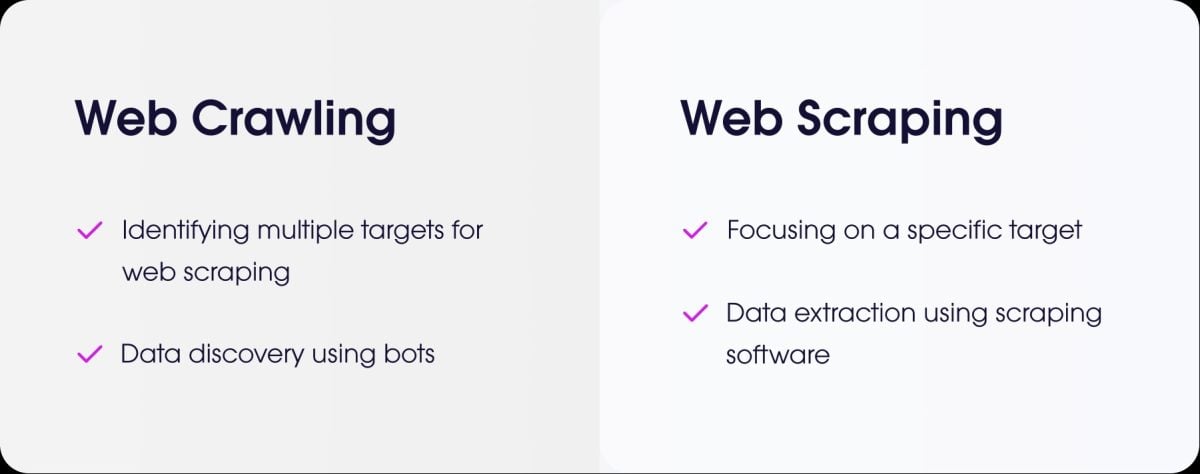
What's the difference between web scraping and web crawling?
- the web scraping is the act of extracting specific data from a website.
- the web crawling is the act of browsing pages to index them.
How do I scrape a site that requires login?
To scrape a site that requires authentication, you need to simulate connection. With PHP, the most common solution is Guzzle.
You send the credentials via a POST request, then keep the session open to retrieve the protected pages.
How do you manage scraping of sites with dynamic AJAX-loaded pages?
⚠ As a reminder, PHP cannot execute client-side JavaScript code.
To scrape this type of page with PHP, you can use BrowserShota library that uses a real browser in the background (Headless Chrome/Chromium) to load the page and execute JavaScript.
Another solution is to integrate PHP with Node.js-based toolsPuppeteer to generate rendered HTML and then retrieve the data from PHP.
For all types of web scraping with dynamic pages, you can also use specialized tools called headless browsers.
Are there any alternatives to PHP for web scraping?
Yes, several languages are popular:
- Python with powerful libraries like BeautifulSoup and Scrapy.
- Node.js which is very efficient for scraping dynamic websites, using libraries such as Puppeteer or Cheerio.

How to program a scraper ethically and responsibly?
To scrape ethically, you must :
- ✔ Check the robots.txt file to find out the rules.
- ✔ Limit the frequency of your requests to avoid overloading the site server.
- ✔ Respect the conditions use of the site.
- ✔ Do not collect personal data without authorization.
✅ In short, the web scraping is a powerful practice, but it must be used methodically and responsibly.
👉 And you, have you ever created a PHP scraper or another language? Share your experiences in comments.








 English