netflix Is it displaying in the wrong language? It takes just two minutes to change the setting from your account. The steps vary depending on your device: we've detailed each scenario below.
Netflix: The Most Popular Streaming Platform
netflix is the service provided by streaming the most-watched in France. You can access it from just about any device: computer, smartphone, tablet, Smart TV or game console. Just one Netflix account That's all you need to look around.
netflix offers several Subscription Plans depending on your needs. No matter which subscription you have, the language setting is available on all plans.
Its biggest strength is its catalog. You'll find movies, TV shows, documentaries, cartoons, and even reality TV. All you need is an internet connection to watch your favorite movies and TV shows in just a few seconds.
One detail that many people only realize after the fact: most content offers several available languages for audio and subtitles. So you can definitely watch Netflix in French, whether it's the interface, the voice acting, or the subtitles.
How to Change Netflix Language
It takes two minutes to set up, but the steps vary depending on your device. Before you begin, keep one important thing in mind: netflix allows you to adjust three elements separately.
- The display language (the menus and interface).
- The audio language (dubbing of movies and TV shows).
- The subtitles.
You can combine them however you like, based on your preferences. Here are the steps to follow for each platform.
Change the language on the official website (web browser)
This is the most comprehensive method, since it configures the interface, audio, and subtitles all at once. On a computer, log in to your account using your e-mail address and your password, then follow these steps:
- Log in to your account at netflix.com.
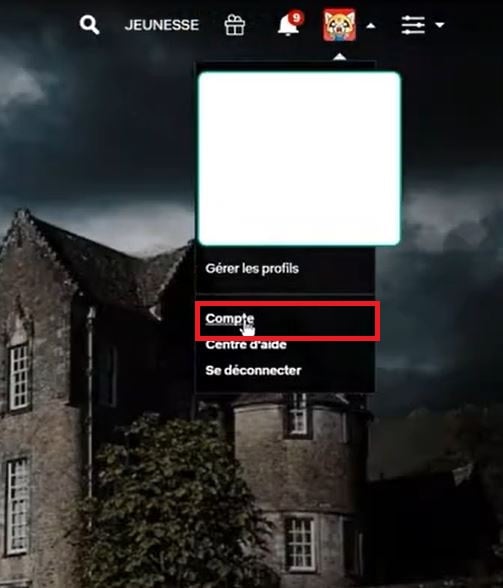
- Click on your avatar, in the upper-right corner of the screen.

- Select Account.
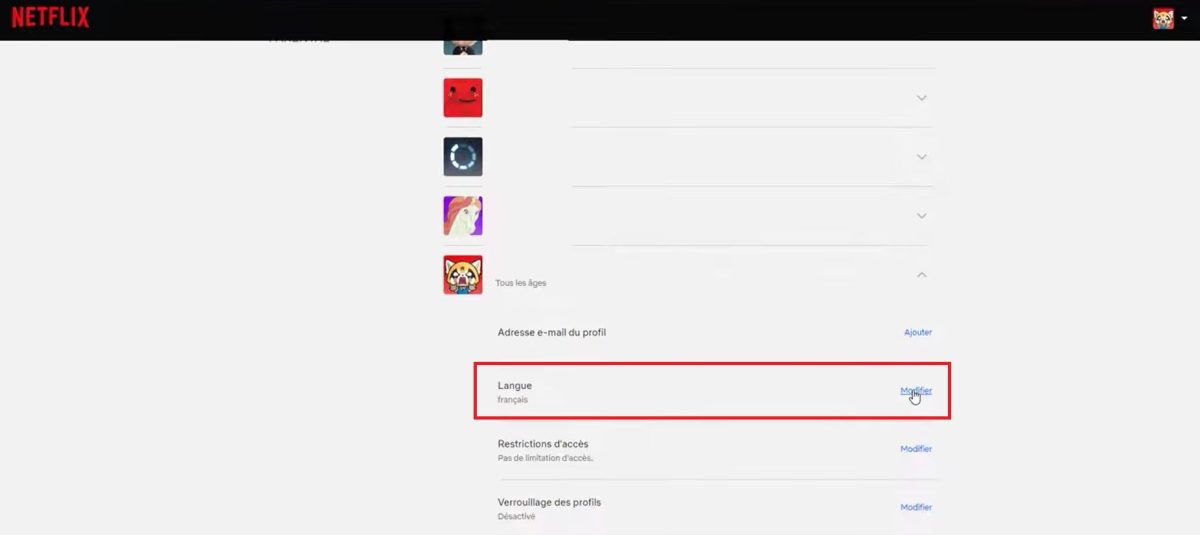
- Scroll down to the list of profiles and click on yours. In the "Language" subsection, click on Edit.
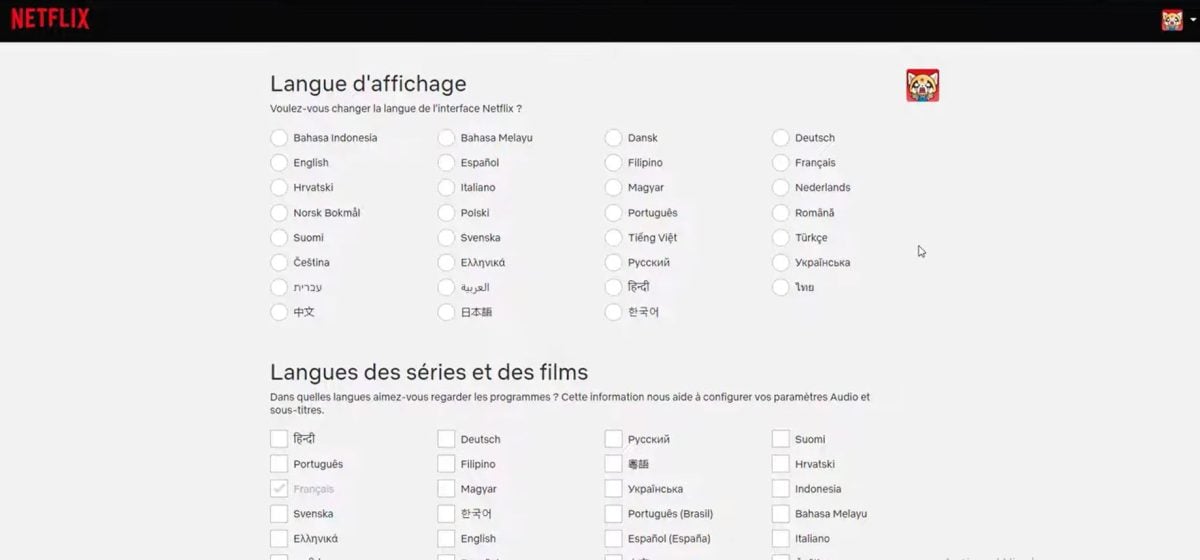
- Choose the French under “Display Languages” for the interface, and under “TV Show and Movie Languages” for dubbing and subtitles.
- Click on To register to confirm your selection.
This setting will then apply to all your movies and TV shows. You can also adjust the video quality depending on your connection.
Change the language in the Netflix app (iOS and Android)
On your smartphone or tablet, start by downloading the app Netflix. It is available on the Google Play Store to Android and on the’App Store for devices iOS. Next, follow these steps:
- Open the app and tap your profile icon.

- Tap the three bars in the upper-right corner and select Manage profiles.
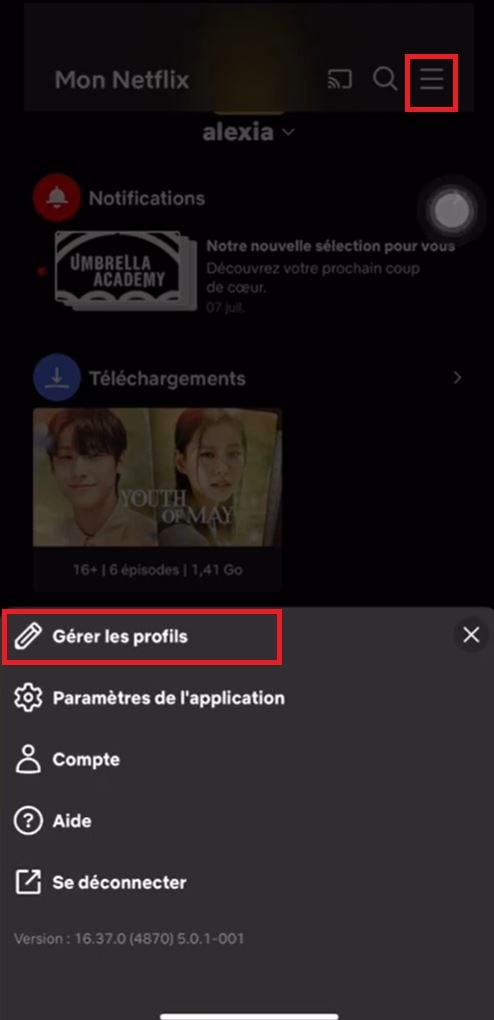
- Select the profile you want to edit, and then select display language to change languages.
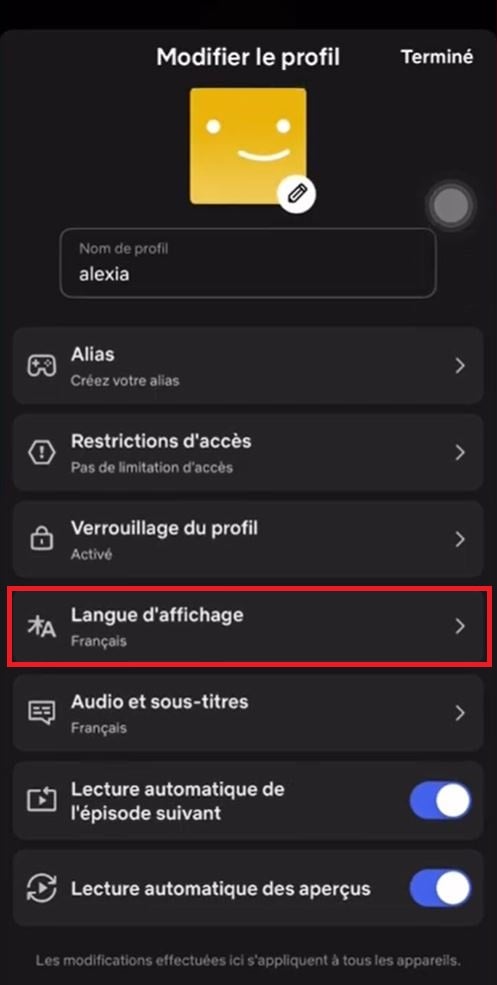
The new language is saved automatically, with no button to confirm. Note: On mobile, “Manage Profiles” only adjusts the display. For the’audio and subtitles, select your language directly while watching a movie or TV show using the dedicated icon on the player. The default audio setting is configured on the website netflix.com.
Change the Language on Smart TVs and Streaming Devices
On a Smart TV, a Apple TV or a console, the app Netflix does not always offer a separate language setting. It often follows the system language on your TV.
The easiest thing to do is to modify the display language from the website, as described above. The change will then be reflected on your TV. If the audio or subtitles remain in English, change them while watching content using the player options. And if that doesn't work, go to the system settings on your TV to switch the device to French.
Will Netflix stay in English after all?
Two simple steps will solve most problems. First, make sure you've actually modified the good profile : Each profile has its own language settings. Next, log out and then log back into your account Netflix, or empty the app cache. If the setting doesn't work, you can cancel and start over from your account settings.
Some titles also require the original version; in such cases, the absence of a French dub is perfectly normal.
If you want to access content in other languages, please note that it's also possible to get the Japanese Netflix with a little configuration.
FAQs
Can I change the language for multiple profiles?
Yes. Each profile has its own settings. Repeat the procedure starting from netflix.com for each profile you want to edit.
Can I watch Netflix in French on a Smart TV?
Yes. First, change the language on the website or in the mobile app. If the interface on your TV remains in English, also change the system language on your TV in French.
Can I choose different languages for the audio and subtitles?
Yes. netflix lets you freely combine audio and subtitles. For example: English audio and French subtitles. You can adjust this setting directly while watching your movies and TV shows using the dedicated icon on the player.








 English