How do I put the game in French on Undertale?

React :

Comment

Undertale is an independent RPG developed by Toby Fox. Available in English and Japanese, Unfortunately, the game is not available in French.

In this article, I explain how to set Undertale to French.
Official game title Undertale
Undertale is an independent role-playing game that has been available on Steam since 15/09/2015. ©️ Karen for Alucare.fr

1. Download the FR patch to put Undertale in French

When you start Undertale for the first time, the game will be in English by default. It's impossible to put it in French from within the game.

To translate Undertale into French, you need to download patch on : https://undertale-fr.com

  1. Once on the home page, go to “Download”.
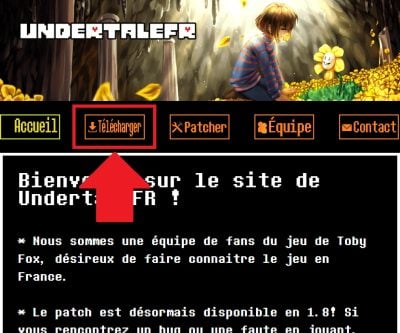
UndertaleFR is a website created by fans of Toby Fox's game.
UndertaleFR is a website created by fans of Toby Fox's game. ©️ Karen for Alucare.fr
  1. Download the corresponding version to your PC's operating system.
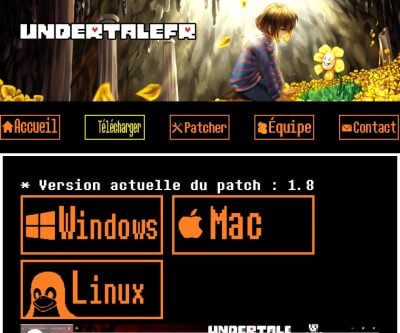
UndertaleFR releases patch 1.8 for Windows, Mac and Linux.
UndertaleFR brings you patch 1.8 for Windows, Mac and Linux. ©️ Karen for Alucare.fr
  1. Open the of the downloaded folder.
By default, on Windows, you'll find the compressed folder in your "Downloads" folder.
By default, on Windows, you will find the compressed folder in your “Downloads” folder. ©️ Karen for Alucare.fr
  1. Right-click to extract file.
You can extract the file on the spot or to a pre-destined folder, depending on your preferences.
You can extract the folder on the spot or to a pre-destined folder according to your preferences. ©️ Karen for Alucare.fr
  1. You will then obtain the following files once the extraction has been completed.
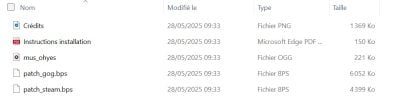
For the rest of the tutorial, the file we're interested in is "patch_steam.bps".
For the rest of the tutorial, the file we are interested in is “patch_steam.bps.” ©️ Karen for Alucare.fr

Remark : Disable your antivirus software while you patch Undertale on your PC.

2. Patch Undertale to put it in French

Then move on to next steps to patch Undertale in French :

  1. Return to the Undertale FR website (https://undertale-fr.com) And go to “Patcher”.

On UndertaleFR, you can patch your Undertale game on PC.
On UndertaleFR, you can patch your Undertale game on PC. ©️ Karen for Alucare.fr
  1. Visit drag the “patch_steam.bps” file onto “File .bps”.
You can also "Choose a file" for ".bps file" and select "patch_steam.bps".
You can also “Choose a file” for “.bps file” and select “patch_steam.bps.” ©️ Karen for Alucare.fr
  1. Check that the file has been taken into account on the site.
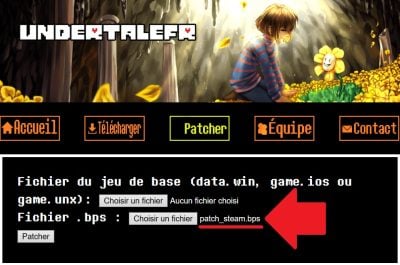
The "patch_steam.bps" file should appear as in the screenshot above.
The “patch_steam.bps” file should appear as shown in the screenshot above. ©️ Karen for Alucare.fr
  1. Locate the location of the “data.win” file.” of your Undertale game via Steam.
Instead of wasting time searching for the file in your computer's folders, go to Undertale's settings on Steam!
Instead of wasting time searching for the file in your computer's folders, go through the Undertale settings in Steam! ©️ Karen for Alucare.fr
    • On Steam, visit your local Library.
    • Click on Undertale.
    • Press the gearwheel ⚙️ and select “Properties”.
    • Then go to “Installed Files.”.
    • Click on “Browse…” and you'll be automatically redirected to the folder where your files are stored on Undertale.
  1. Look for the file “data.win”, This is about saving your game.
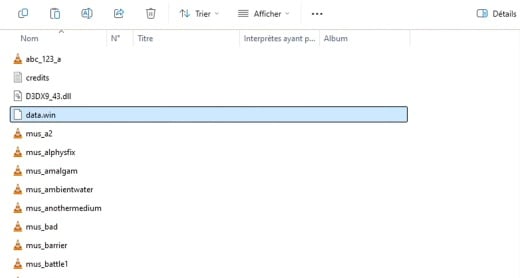
Logically, you'll see "data.win" at the top of the list.
Logically, you will see “data.win” at the top of the list. ©️ Karen for Alucare.fr

Remark : Make a copy of “data.win” so you have a backup just in case.

  1. Visit drag the “data.win” file onto “Base game file”.
You can also "Choose a file" for "Base set file" and select "data.win".
You can also “Choose a file” for “Base game file” and select “data.win.” ©️ Karen for Alucare.fr
  1. Check that the file has been taken into account on the site.
The "data.win" file should appear as in the screenshot above.
The “data.win” file should appear as shown in the screenshot above. ©️ Karen for Alucare.fr
  1. Once everything is OK, click on “Patch”.
A download will be launched directly and you will have a new "data.win" for Undertale.
A download will start immediately and you will have a new “data.win” for Undertale. ©️ Karen for Alucare.fr
  1. Visit drag the downloaded file “data.win” into the initial folder of Undertale.
Agree to "Replace existing file" to patch Undertale on your PC.
Agree to “Replace existing file” to patch Undertale on your PC. ©️ Karen for Alucare.fr

Remark : This patch does not work on consoles. You can only use it for Undertale on PC (Windows, Linux, and Mac).

3. Test the patched Undertale on your PC

Once you have followed all the above steps, your game is normally patched.

To check that Undertale is in French, theance the game from Steam.
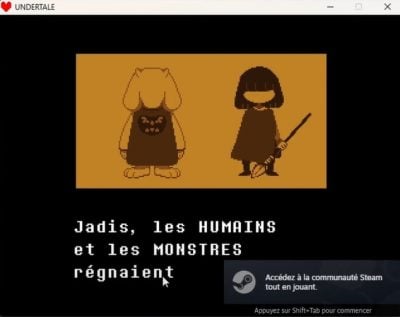
Capture showing Undertale in French after being patched.
Capture showing Undertale in French after being patched. ©️ Karen for Alucare.fr

Now you know how to set Undertale to French ! As a reminder, this patch is only suitable for PC games and does not work on consoles.

Don't forget to disable your antivirus software time to patch Undertale.

Found this helpful? Share it with a friend!

This content is originally in French (See the editor just below.). It has been translated and proofread in various languages using Deepl and/or the Google Translate API to offer help in as many countries as possible. This translation costs us several thousand euros a month. If it's not 100% perfect, please leave a comment for us to fix. If you're interested in proofreading and improving the quality of translated articles, don't hesitate to send us an e-mail via the contact form!
We appreciate your feedback to improve our content. If you would like to suggest improvements, please use our contact form or leave a comment below. Your feedback always help us to improve the quality of our website Alucare.fr


Alucare is an free independent media. Support us by adding us to your Google News favorites:

Post a comment on the discussion forum

Undertale

Released on : September 15, 2015

Developed by : Toby Fox

Edited by : Toby Fox

Available on : PC, Mac, Linux, PlayStation, Switch

Genres : RPG, Action





